Laser Barn
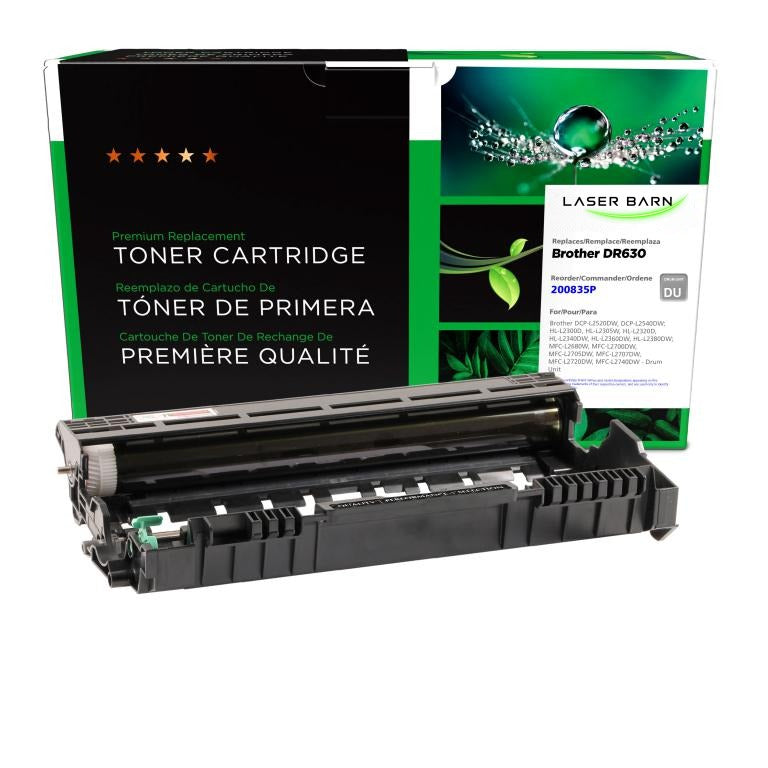
Brother DR630 Remanufactured Drum Unit for DCP-L2520DW/HL-L2300D/MFC-L2680W+
Brother DR630 Remanufactured Drum Unit for DCP-L2520DW/HL-L2300D/MFC-L2680W+
- Compatible printers
- Brother DCP-L2520DW, DCP-L2540DW; HL-L2300D, HL-L2305W, HL-L2320D, HL-L2340DW, HL-L2360DW, HL-L2380DW; MFC-L2680W, MFC-L2700DW, MFC-L2705DW, MFC-L2707DW, MFC-L2720DW, MFC-L2740DW
- OEM savings
- Up to 40% less than OEM
Print or we make it right. 100% post-tested · free ground · 1-year defect warranty. Wrong cart or DOA? We replace or refund — fast. Details
- OEM part replaced
- Brother DR630
- Type
- Drum Unit
- Printer brand
- Brother
- Color
- Black
Couldn't load pickup availability
Overview
This Laser Barn remanufactured drum unit replaces the Brother DR630 and works with your toner to produce clean, even prints.
Every drum unit is 100% post-tested, so you get dependable output for up to 40% less than OEM.
We ship nationwide, straight to your door.
Specifications
| Brand | Laser Barn |
|---|---|
| Replaces OEM | Brother DR630 |
| Color | N/A (drum unit) |
| Compatible printers | Brother DCP-L2520DW, DCP-L2540DW; HL-L2300D, HL-L2305W, HL-L2320D, HL-L2340DW, HL-L2360DW, HL-L2380DW; MFC-L2680W, MFC-L2700DW, MFC-L2705DW, MFC-L2707DW, MFC-L2720DW, MFC-L2740DW |
How to reset the drum counter
A new drum unit comes with a fresh drum, but your printer keeps its own drum counter. Reset that counter after you install this drum so the printer stops showing "Replace Drum" (or a flashing Drum light). Only reset it when you install a new drum, not when you change toner.
HL-L2300D, HL-L2320D
- Turn the printer on and open the front cover.
- Hold the Go button for about 4 seconds, until all the lights come on.
- Release Go and close the front cover.
- Check that the Drum light is off.
HL-L2305W, HL-L2340DW, HL-L2360DW
- Turn the printer on and open the front cover.
- Hold OK for about 2 seconds, until Drum Unit appears.
- Press OK.
- Press the Up arrow to choose Reset, then close the front cover.
DCP-L2520DW, DCP-L2540DW; MFC-L2680W, MFC-L2700DW, MFC-L2705DW, MFC-L2707DW
- Turn the machine on and open the front cover.
- Hold OK for about 2 seconds.
- Press the Up arrow (or 1) to reset the counter.
- Close the front cover.
HL-L2380DW; MFC-L2720DW, MFC-L2740DW (touchscreen)
- Turn the machine on and tap Cancel to clear the message.
- Tap Settings > All Settings > Machine Info. > Parts Life.
- Touch the keypad area so it lights up, then press and hold # until the message changes.
- Tap Drum, then Yes, then Home.
FAQ
Will this work in my Brother DCP-L2540DW?
Yes. It replaces the Brother DR630 and fits the Brother DCP-L2520DW, DCP-L2540DW, HL-L2300D, HL-L2305W, HL-L2320D, HL-L2340DW, HL-L2360DW, HL-L2380DW, MFC-L2680W, MFC-L2700DW, MFC-L2705DW, MFC-L2707DW, MFC-L2720DW and MFC-L2740DW.
Is this a new OEM Brother drum?
No. It is a Laser Barn remanufactured drum unit built to replace the Brother DR630, at up to 40% less than OEM.
Do you offer local pickup?
No. Every order is drop shipped, and we ship nationwide.
Compatibility
- OEM part replaced
- Brother DR630
- Compatible printers
- Brother DCP-L2520DW, DCP-L2540DW; HL-L2300D, HL-L2305W, HL-L2320D, HL-L2340DW, HL-L2360DW, HL-L2380DW; MFC-L2680W, MFC-L2700DW, MFC-L2705DW, MFC-L2707DW, MFC-L2720DW, MFC-L2740DW
Shipping
- Shipping
- Free ground shipping
- Fulfillment
- Drop shipped nationwide, straight to your door
Every order is drop shipped, so there is no local pickup. Free shipping applies to ground service only.
Share